
Credit Types
1. Analysis Credits
Analysis credits are consumed whenever Rankwit tracks or analyzes a response from an AI engine. We keep it simple: 1 analyzed response = 1 credit, regardless of which model you use. Supported Models:- ChatGPT (OpenAI)
- Google AI Overviews
- Perplexity
- Gemini (Google)
2. Page Credits
Content creation has its own dedicated credit pool so you can manage your editorial budget independently.- 1 Generated Article = 1 Page Credit
How credits are calculated
1 credit = 1 prompt × 1 AI model. Each time a prompt is checked on one AI model (ChatGPT, Perplexity, Google AI Overview, Gemini), that counts as one credit. If the same prompt is monitored on three models, it uses three credits. Example: You monitor 1 prompt on ChatGPT, Gemini, and Perplexity. That’s 1 × 3 = 3 credits for that prompt per run. So: more prompts or more models per run mean more credits. Your plan’s unique prompts per month and the models you select in each run determine your usage.Quick reference: credits by scenario
Use this table to quickly estimate how many credits common runs will use:All models are weighted equally: one credit per prompt per model. Use the in-app Estimate button for the exact count before you run.
Credit lifecycle
Expiration and roll-over
- Reset date: Credits reset on the monthly anniversary of your subscription start date (e.g. if you subscribed on the 15th, your credits reset on the 15th of each month).
- Roll-over: Unused credits typically do not roll over to the next billing cycle; your balance resets to your plan’s allowance. Check your plan details or Billing for your tier’s policy.
Monitoring Your Balance
You can check your remaining credits at any time via:- Dashboard Header: A real-time counter is always visible at the top of your screen.
- Billing Settings: For a detailed breakdown of consumption and subscription management.
Calculation Examples
Weekly Monitoring
If you decide to monitor 10 keywords across 2 models (e.g., Google AI Overviews and ChatGPT, or ChatGPT and Gemini):10 keywords × 2 models = 20 Analysis Credits per run × 4 weeks = 80 Analysis Credits
Content Strategy
If you plan to publish 10 articles per month:10 articles = 10 Article Credits.
Estimate feature: see credits before you run
Before starting an AI run, you can see exactly how many credits the run will use. This helps you adjust prompts or models to stay within your budget.- In Monitoring → AI Runs, select your prompts and models (and location if required).
- Click Estimate to open the estimation popup.
- Review the total credits for the run. Adjust selections if needed, then start the analysis.
Use Estimate in Monitoring → AI Runs before starting a run to see how many credits the run will use. That way you can adjust prompts or models before you start.
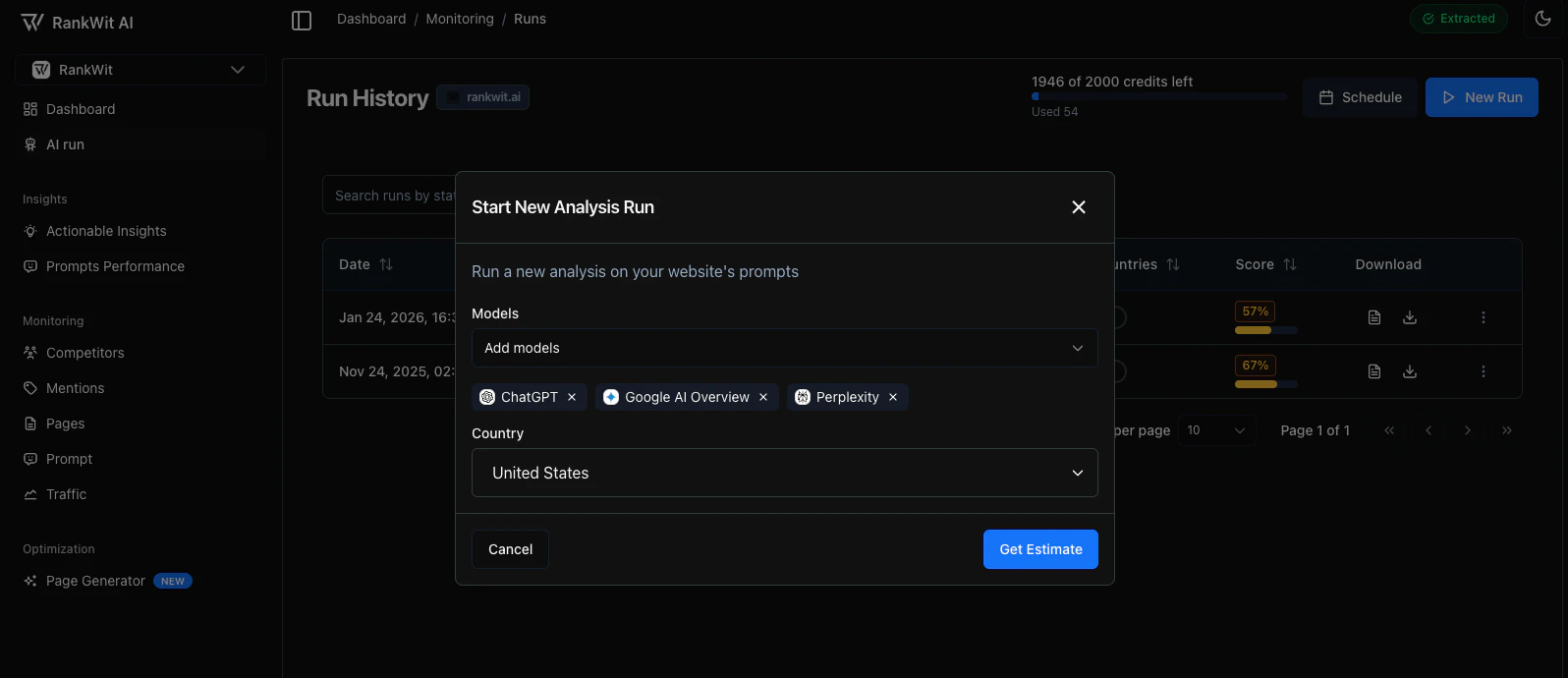
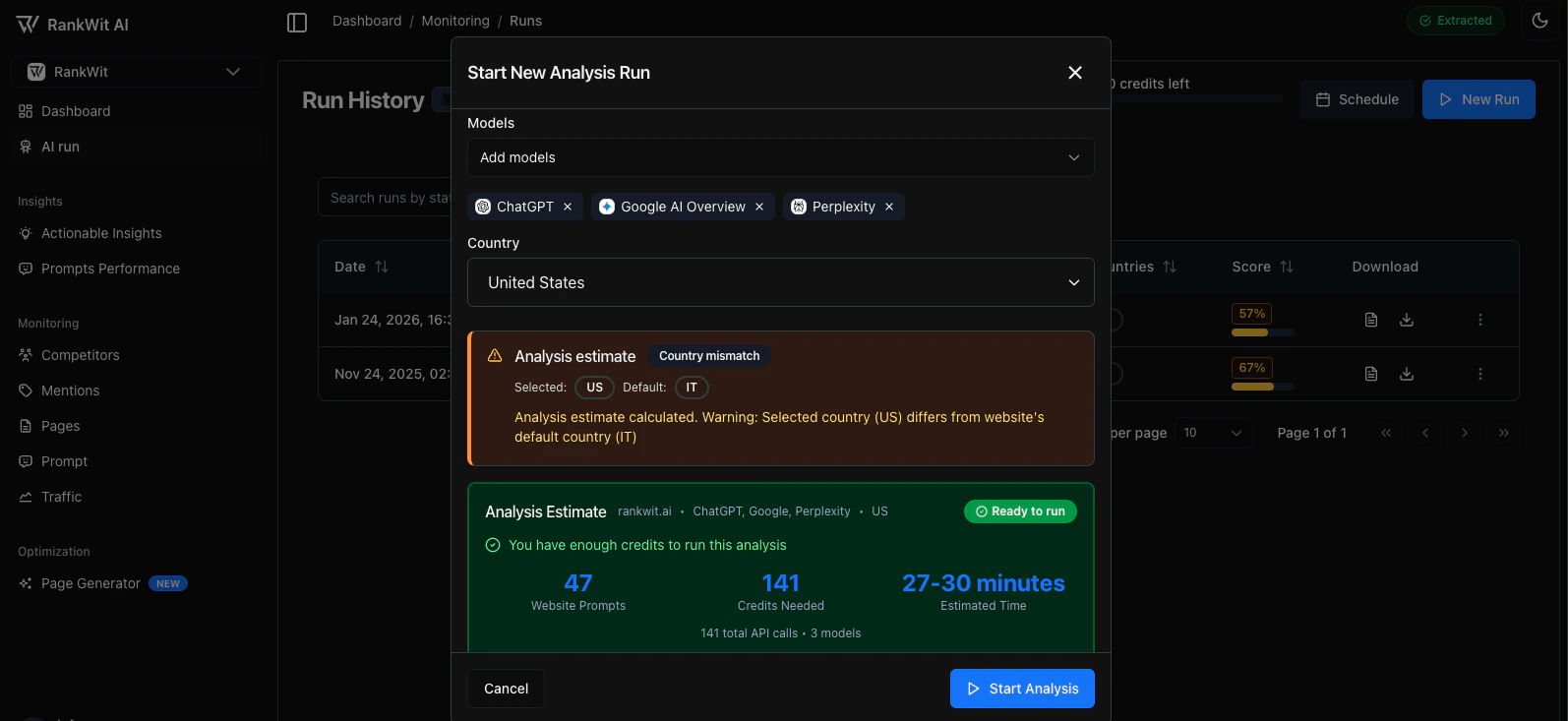
Always use Estimate before starting a large run so you know the credit cost and can avoid overusing your quota.
FAQ: credits and usage
What counts as a “model”?
Every AI model (e.g. ChatGPT, Google AI Overview, Perplexity, Gemini) counts as one unit per prompt. All models are weighted equally—one credit per prompt per model.What if I need more credits?
If you need additional credits beyond your monthly allocation, please contact info@rankwit.ai to discuss available options.Do failed runs cost credits?
No. If a run fails due to a system or service error (e.g. API timeout, provider outage), RankWit does not charge credits for that run. You are only charged for runs that complete successfully. If you believe you were charged for a failed run, contact support.Do my credits renew every month?
Yes. Your credits are automatically recharged at the beginning of each monthly billing cycle. Each month, your credit balance is reset according to your subscription plan. Unused credits do not roll over unless explicitly stated in your plan details.Can I cancel a run to save credits?
If you stop or cancel a run before it finishes, you are only charged for the work already completed (e.g. prompts × models already processed). The remaining portion is not deducted. So yes—cancelling a run can save credits for the part that has not yet run.Pro-Tip: Save credits with selection
If you are only testing prompt quality, run your first test on a single model (e.g. ChatGPT). Once you’re satisfied with the output, scale the run to include other models (AIO, Perplexity, Gemini) to compare ranking results. This avoids burning credits on multi-model runs until your prompts are ready.
If you are only testing prompt quality, run your first test on a single model (e.g. ChatGPT). Once you’re satisfied with the output, scale the run to include other models (AIO, Perplexity, Gemini) to compare ranking results. This avoids burning credits on multi-model runs until your prompts are ready.