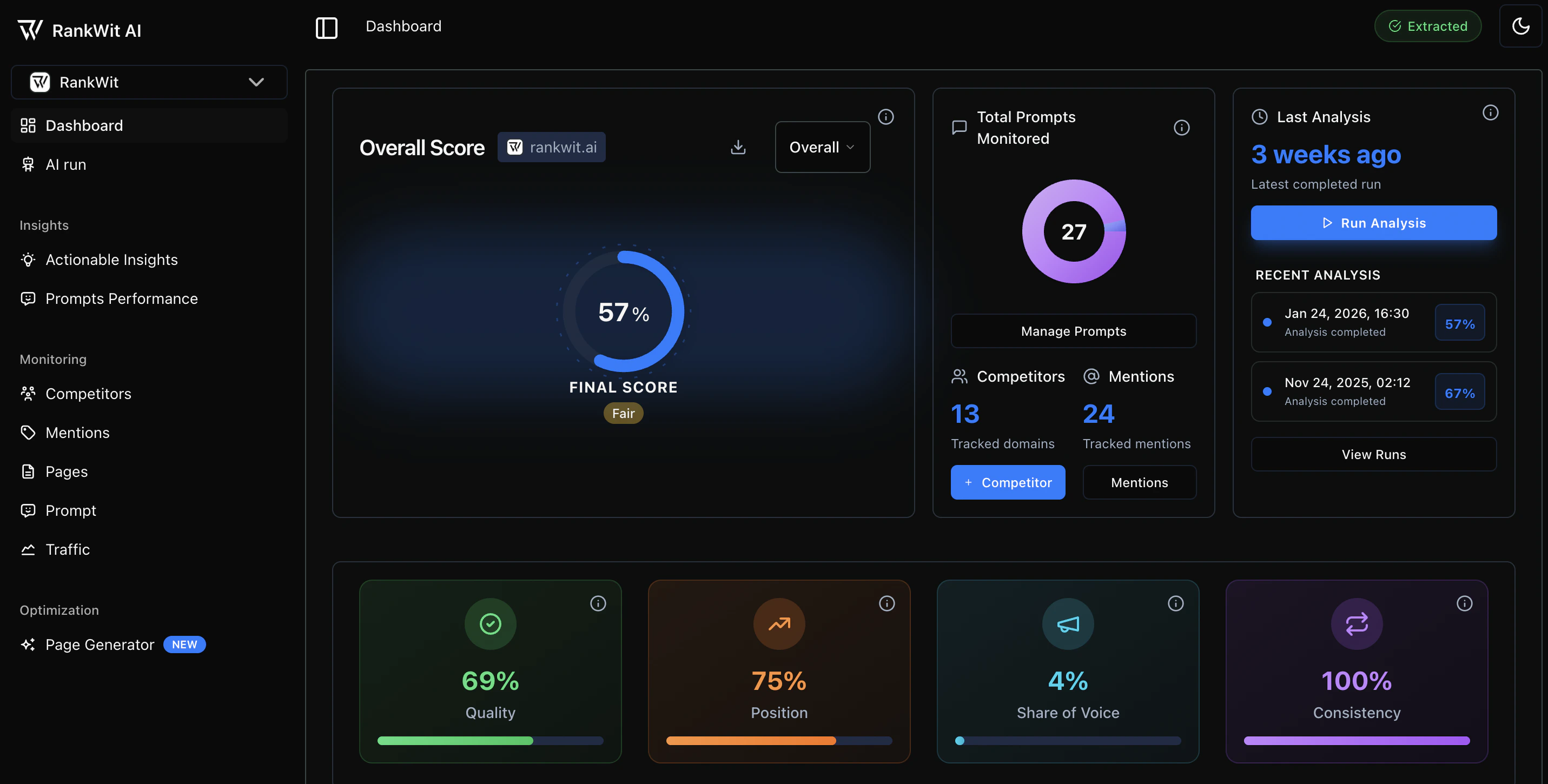
1. Sidebar Navigation
The sidebar is organized into logical groups to manage your AI Engine Optimization (AEO) workflow: Project Switcher: Select the specific project or brand you are currently managing.2. Core Performance Score
The main widget on your dashboard displays your authoritative score. This metric is dynamic and can be filtered to provide a specific view of your data.Score Toggles
You can switch the view using the dropdown menu in the top-right of the widget:- Branded: Analyzes prompts that explicitly mention your brand name (e.g., “What is RankWit AI?”).
- Non-Branded: Analyzes “discovery” prompts where your brand could be a solution (e.g., “Best AI SEO automation tools”).
- Overall: A comprehensive weighted average that includes both Branded and Non-Branded data.
- Download Report: Export the current view as a report for stakeholders.
- Status Label: A qualitative indicator (e.g., “Good”) based on your percentage score.
3. Monitoring Widgets
Total Prompts Monitored
- Visual Tracker: A circular chart showing the volume of queries currently being tracked.
- Manage Prompts: Direct link to add new keywords or refine your existing list.
Competitive Landscape
- Competitors: Shows the total number of competitor domains being benchmarked.
- Mentions: The total number of times your brand was cited in the latest analysis.
- Action: Click + Competitor to instantly add a new domain to your monitoring.
Analysis Status
- Recency: Displays when your data was last refreshed (e.g., “2 months ago”).
- Run Analysis: Manually trigger a new scan of all models using your credits.
- Recent Analysis Log: View the progress and completion status of your most recent data extractions.
4. Key Performance Indicators (KPIs)
The bottom row of the dashboard breaks down your performance into four specialized metrics:| Metric | What it Measures | Calculation | Why it Matters |
|---|---|---|---|
| Subjective Impression | How well your content answers user queries compared to competitors. | AI models evaluate the relevance, completeness, and accuracy of your content in search results. | High scores indicate your content provides valuable, comprehensive answers that users find helpful. |
| Position Score | How high your website ranks in AI search results compared to competitors. | Based on your average ranking position (1st, 2nd, 3rd, etc.) across all analyzed queries. | Higher positions mean more visibility and credibility; users typically trust and click results that appear first. |
| Share of Voice | How often your website appears in AI search results across different queries. | Based on the percentage of queries where your website is mentioned in the AI’s response. | A higher share of voice means broader content coverage and relevance across more search topics. |
| Consistency Score | How consistently your website performs across different AI models. | Based on the similarity of your rankings and mentions across multiple AI model responses. | High consistency ensures your content performs well regardless of which AI model users interact with. |
4. Top Header Actions
- Status Indicator: Shows the current system status (e.g., “Extracted” confirms data has been processed).
- Theme Toggle: Switch between Dark and Light mode for better visibility.
- Layout Icon: Quickly collapse or expand the sidebar for a focused view.