> ## Documentation Index
> Fetch the complete documentation index at: https://docs.rankwit.ai/llms.txt
> Use this file to discover all available pages before exploring further.
# Mentions
> How to view, use, and manage brand or site mentions in RankWit, including moving mentions to competitors.
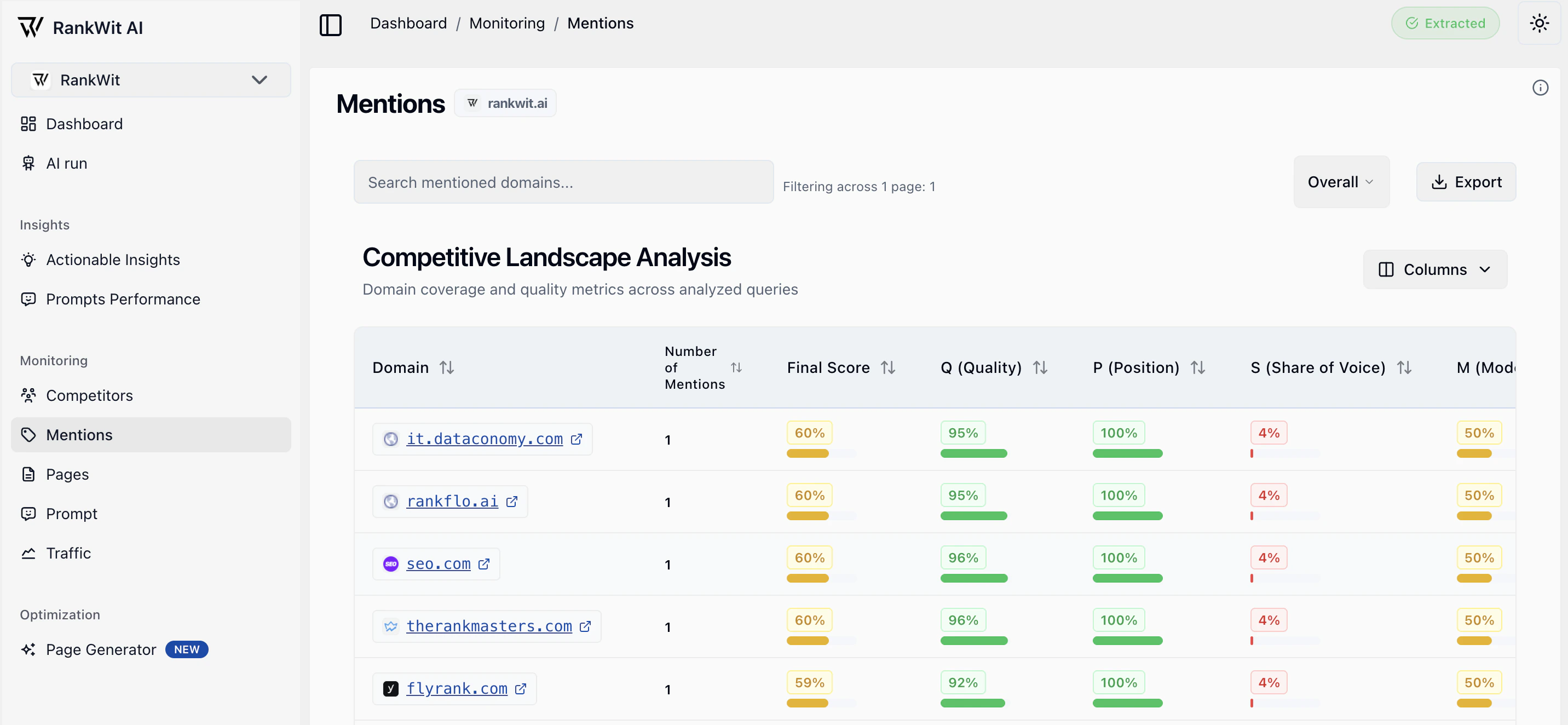
The **Mentions** section in Monitoring shows where your brand or site is mentioned (e.g. on the web or in tracked sources). You can review, filter, and reclassify mentions—including moving them to a competitor when a mention actually refers to someone else.
## What you see
* A list or feed of **mentions** (source, date, snippet or context).
* Optional filters (e.g. date range, source type) when available.
* Details when you open a mention (e.g. full text, link).
* Actions such as **Convert to competitor** when the mention refers to another brand or site.
 ## Why mentions are useful
Mentions help you understand where and how your brand is talked about. They are especially useful for:
* **Seeing relevant source in your industry** — Track media, blogs, forums, and other sources that cite you.
* **Following up on opportunities or issues** — Respond to reviews, thank publishers, or address misinformation.
* **Discovering valid websites for backlinks** — When a site mentions you (e.g. in an article, list, or review), that site is often a good candidate for outreach or future backlinks. Use the mention list to identify authoritative, relevant sources that already reference you and consider them for link-building.
Mentions from quality, relevant sites are strong signals for SEO: they show interest in your brand and can lead to formal backlinks. Review the source domain and context before adding it to your backlink target list.
## How it works
Mentions are collected from the sources connected to your account. Use this view to review and act on them as described above.
## Using the list
* **Sort** by date or relevance when the option is available.
* **Open** a mention to see full context and link.
* Use **filters** (if shown) to narrow by date, source, or type.
* **Convert to competitor** when a mention is about a competitor.
## Moving a mention to a competitor
Sometimes a mention is incorrectly attributed to your brand—for example, it refers to a competitor or another site with a similar name. You can reclassify it so it no longer appears in your mentions and is associated with the right competitor instead.
1. Open the mention (or use the row/entry actions).
2. Click **Convert to competitor** (or the equivalent action).
3. Choose the **competitor** from the list, or add the competitor first in [Competitors](/monitoring/competitors) if needed.
4. Confirm. The mention is removed from your brand mentions and linked to that competitor.
This keeps your mention list accurate and helps you compare how often competitors are mentioned versus you.
Moving a mention to a competitor does not delete it—it reassigns it so your metrics reflect only mentions of your brand.
Next: [Pages](/monitoring/pages) or [Prompt](/monitoring/prompt).
## Why mentions are useful
Mentions help you understand where and how your brand is talked about. They are especially useful for:
* **Seeing relevant source in your industry** — Track media, blogs, forums, and other sources that cite you.
* **Following up on opportunities or issues** — Respond to reviews, thank publishers, or address misinformation.
* **Discovering valid websites for backlinks** — When a site mentions you (e.g. in an article, list, or review), that site is often a good candidate for outreach or future backlinks. Use the mention list to identify authoritative, relevant sources that already reference you and consider them for link-building.
Mentions from quality, relevant sites are strong signals for SEO: they show interest in your brand and can lead to formal backlinks. Review the source domain and context before adding it to your backlink target list.
## How it works
Mentions are collected from the sources connected to your account. Use this view to review and act on them as described above.
## Using the list
* **Sort** by date or relevance when the option is available.
* **Open** a mention to see full context and link.
* Use **filters** (if shown) to narrow by date, source, or type.
* **Convert to competitor** when a mention is about a competitor.
## Moving a mention to a competitor
Sometimes a mention is incorrectly attributed to your brand—for example, it refers to a competitor or another site with a similar name. You can reclassify it so it no longer appears in your mentions and is associated with the right competitor instead.
1. Open the mention (or use the row/entry actions).
2. Click **Convert to competitor** (or the equivalent action).
3. Choose the **competitor** from the list, or add the competitor first in [Competitors](/monitoring/competitors) if needed.
4. Confirm. The mention is removed from your brand mentions and linked to that competitor.
This keeps your mention list accurate and helps you compare how often competitors are mentioned versus you.
Moving a mention to a competitor does not delete it—it reassigns it so your metrics reflect only mentions of your brand.
Next: [Pages](/monitoring/pages) or [Prompt](/monitoring/prompt).